Review the result workflow
See how configured test parameters are used during result entry and what information is available before a report is finalized.
Explore result entryBuild a reliable reporting workflow from patient registration and testing to result verification and professional PDF reports.
Keep every reporting stage connected so your team can work from the same patient, order and result context. The goal is to give the next person the context, status, and configured information needed to continue the work.
Use a live walkthrough to check how PathMLT handles the reporting steps your laboratory performs every day. Bring one representative test panel and your current report format so you can evaluate fit against your real workflow.
See how configured test parameters are used during result entry and what information is available before a report is finalized.
Explore result entryReview the available product example and assess report structure, values, units, flags, and reference information for your needs.
View PDF reporting detailsDiscuss the review and finalization steps your team needs, including how responsibilities should be handled in your workflow.
Explore result verificationStart a 30-day free trial or contact the team to discuss a live walkthrough before deciding whether the product fits your laboratory.
Laboratory reporting software turns completed laboratory work into a controlled, repeatable reporting process. The important distinction is that a report is produced from structured patient, order, test, and result data rather than rebuilt manually in a document editor.
Manual reporting creates repeated data entry, inconsistent formatting, unclear review ownership, and avoidable transcription risk. A reporting workspace keeps the patient and order context attached to the result while the report moves through entry, validation, verification, finalization, and delivery.
Evaluate patient and order capture, configurable tests and parameters, required-result checks, reference information, result verification, report templates, PDF generation, and a clear final status. These pieces matter because report quality depends on the workflow before the document is generated.
A manual document can reproduce a final layout, but it does not inherently know whether every required parameter was entered or verified. Structured reporting uses configured fields and workflow states so the final report reflects a known result set and can be reproduced consistently.
Ask how a laboratory configures tests, handles abnormal or missing values, separates entry from verification, controls release, preserves report history, and supports the formats patients and clinicians actually receive. A useful system should explain these handoffs clearly, not only show a feature list.
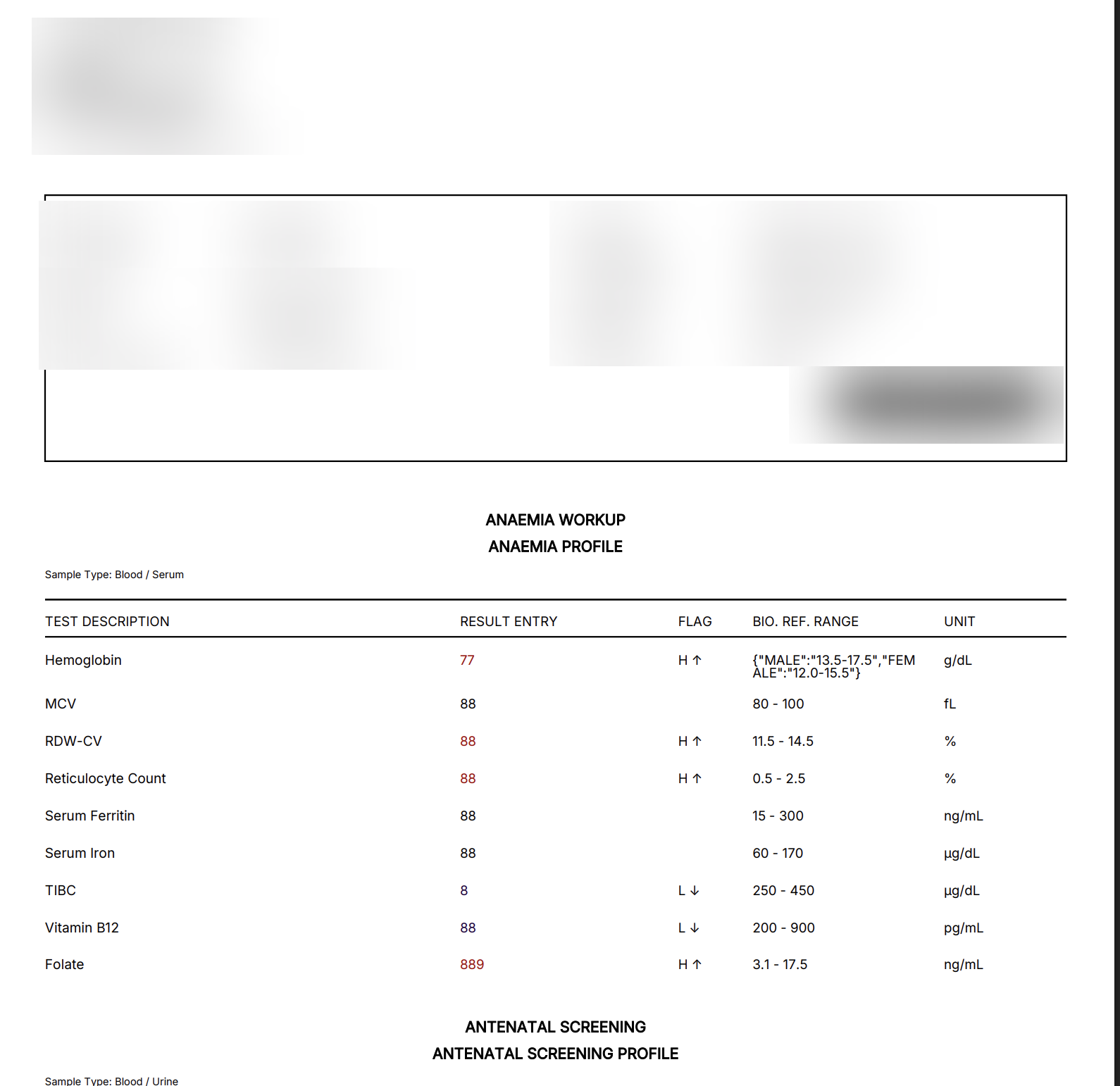
This anonymized product example shows an anemia profile with multiple configured tests, result values, abnormal flags, biological reference ranges, units, and a second report section.
Designed for: Diagnostic and pathology laboratories that want a structured alternative to spreadsheets and disconnected reporting tools.
Reporting works best when the report is the final output of structured laboratory data rather than a separate document-building task. The stages below show where this capability creates a clear handoff in that process.
Create the patient and order once.
Connect samples and enter configured results.
Review flags, ranges and required values.
Finalize and generate the patient report.
Keep patient, order, test and result context together so staff do not re-enter the same information. Use the remaining capabilities below to assess the records, decisions, and handoffs that matter to this workflow.
For diagnostic and pathology laboratories that want a structured alternative to spreadsheets and disconnected reporting tools., these scenarios show how the workflow can support the daily records and handoffs that need to remain dependable.
Standardize patient-to-report workflows across routine diagnostic testing.
Give reviewers a consistent place to check results before release.
Generate patient-ready reports from the same structured data used during testing.
PathMLT is designed around connected patient, order, test, result, verification and reporting workflows so teams can move between stages without rebuilding the same information.
It is intended for diagnostic and pathology laboratories that need a structured reporting workspace for recurring laboratory operations.
For diagnostic and pathology laboratories that want a structured alternative to spreadsheets and disconnected reporting tools., the product evidence below shows how PathMLT connects this capability to configurable laboratory records and workflows. Exact fields, permissions, and report configuration can vary by laboratory setup.
For laboratory reporting software, tests can include categories, departments, specimen information, methods, turnaround time and reusable parameters. Parameters support numeric, text, select, multiline, boolean, date and qualitative inputs.
Explore test managementIn a laboratory reporting software workflow, the report process loads a laboratory test configuration and its parameters so results can be entered against defined fields instead of rebuilding report content manually.
Explore result entryFor teams evaluating laboratory reporting software, PathMLT separates result entry from review and finalization, giving them a deliberate checkpoint for required values, flags and completed result sets before release.
Explore result verificationOnce laboratory reporting software is complete, PathMLT can turn the structured result data into a patient-facing laboratory report, including PDF output for delivery or printing.
Explore PDF reportsReporting works best when the report is the final output of structured laboratory data rather than a separate document-building task.
Keep patient, order, test and result context together so staff do not re-enter the same information.
Use verification as a clear checkpoint before a result becomes a patient-facing report.
Standardize report output while allowing each laboratory to configure its own tests and parameters.
Use laboratory reporting software as an entry point, then follow the linked operational steps to evaluate the complete workflow rather than an isolated screen.
Start with the laboratory reporting software process your team performs most often. Then discuss the configuration, report format, access responsibilities, and implementation support that matter to you.